GitLab Integration Guide
Overview
NudgeBee's GitLab integration connects your GitLab instance — whether gitlab.com or self-hosted — to enable two core workflows:
- Automated Merge Requests for Kubernetes rightsizing recommendations
- Issue tracking for incident and event management
With this integration, NudgeBee can clone your infrastructure repositories, apply resource optimizations to Helm values files, and open merge requests — all without leaving the platform.
Capabilities
| Feature | Description |
|---|---|
| Issue Creation | Create GitLab issues from NudgeBee events, alerts, or manually |
| Merge Request Automation | Auto-generate MRs for CPU, memory, and replica rightsizing |
| Duplicate Detection | Adds comments to existing issues instead of creating duplicates |
| Self-Hosted Support | Works with both gitlab.com and on-premise GitLab instances |
| MR Status Tracking | Polls merge request state (opened, merged, closed) in real-time |
Prerequisites
- A GitLab account (gitlab.com or self-hosted)
- A Personal Access Token (PAT) with
apiscope - For merge request automation: Kubernetes workloads annotated with repository details
Step 1: Generate a Personal Access Token
- In GitLab, navigate to Settings > Access Tokens (or User Settings > Access Tokens for personal tokens).
- Set a descriptive Token name (e.g.,
nudgebee-integration). - Set an Expiration date per your security policy.
- Select the
apiscope. This grants full read/write API access required for issue creation and merge requests. - Click Create personal access token.
- Copy the token immediately — GitLab will not show it again.
For self-hosted GitLab instances, you can also use Project Access Tokens or Group Access Tokens to limit the scope to specific projects.
Step 2: Configure GitLab in NudgeBee
- In NudgeBee, navigate to Settings > Integrations > Repos tab.
- Click the Gitlab tile under the Connected or Available section.

-
Click Add GitLab Account in the top-right corner.
-
Fill in the configuration form:
| Field | Required | Description |
|---|---|---|
| Name | Yes | A unique name to identify this GitLab account configuration (e.g., my-gitlab) |
| GitLab URL | No | Instance URL. Defaults to https://gitlab.com. For self-hosted, enter your instance URL (e.g., https://gitlab.mycompany.com) |
| Username | Yes | Your GitLab username — not your email address |
| Personal Access Token | Yes (on create) | The PAT generated in Step 1. On edit, leave empty to keep the existing token |
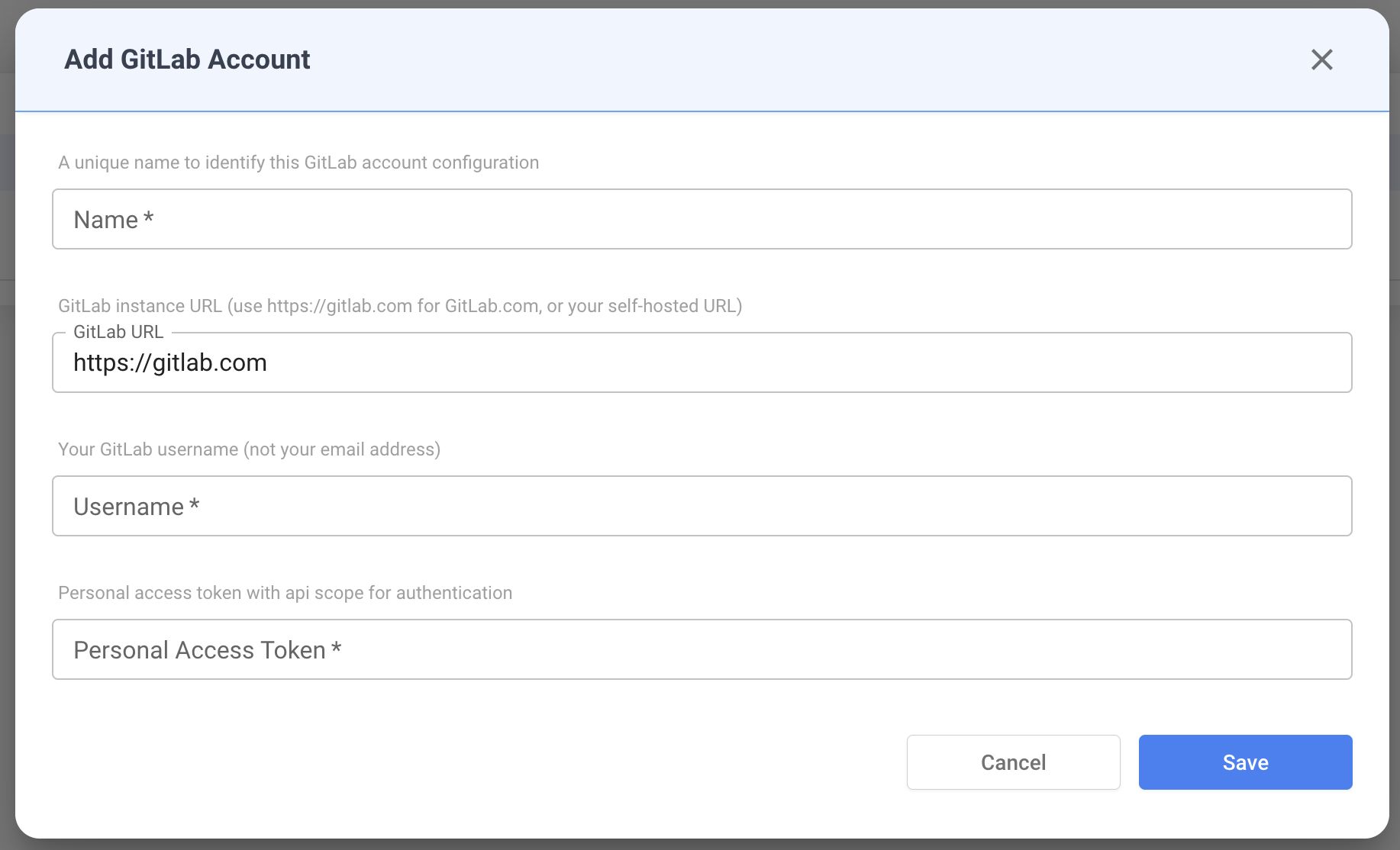
- Click Save. NudgeBee validates the credentials by authenticating against the GitLab API and verifying the username matches.
Step 3: Verify the Connection
After saving, the GitLab account appears in the accounts table.
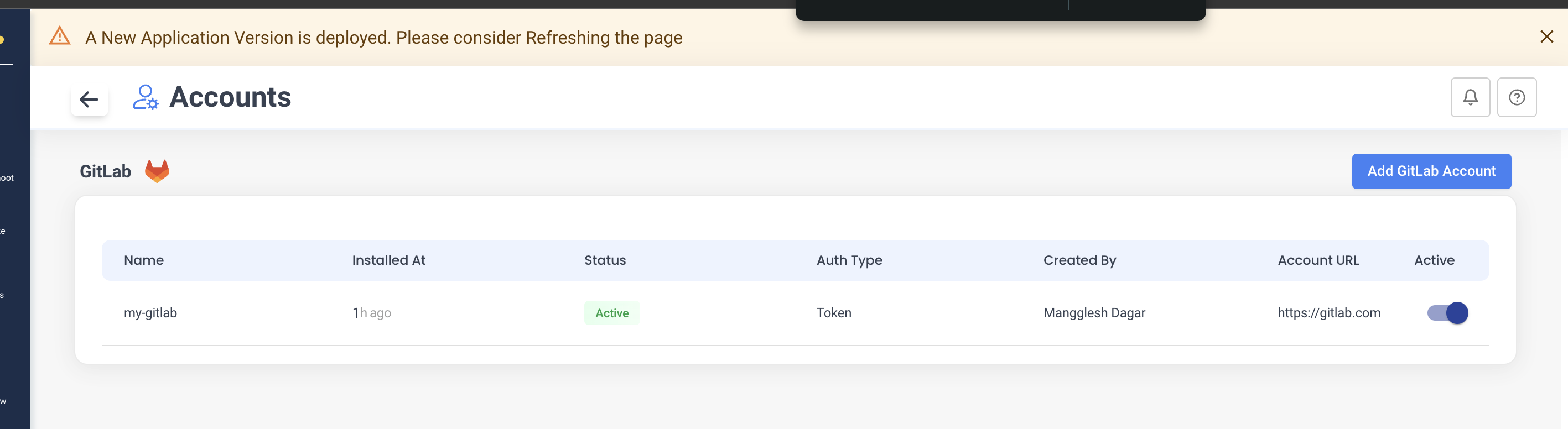
| Column | Description |
|---|---|
| Name | Configuration name you provided |
| Installed At | Time since the integration was created |
| Status | Connection status (Active / Inactive) |
| Auth Type | Authentication method (Token) |
| Created By | User who created the integration |
| Account URL | GitLab instance URL |
| Active | Toggle to enable/disable the integration without deleting it |
Issue Management
Once connected, NudgeBee can create and manage GitLab issues.
How Issues Are Created
NudgeBee creates issues in your GitLab projects when:
- An event or alert triggers automatic ticket creation
- A user manually creates a ticket from the NudgeBee UI
- An autopilot runbook is configured to raise tickets
Issue Fields
| Field | Description |
|---|---|
| Project | Target GitLab project (format: group/project or group/subgroup/project) |
| Title | Issue title |
| Description | Markdown-formatted issue body with workload details |
| Assignee | GitLab user assigned to the issue (looked up by username) |
| Labels | Project labels — NudgeBee automatically adds a nudgebee label |
Duplicate Handling
NudgeBee tracks issues by reference ID. If an issue already exists for the same event:
- A comment is added to the existing issue instead of creating a duplicate
- The comment includes the new occurrence timestamp and context
Example: Rightsizing Issue
Below is a GitLab issue created by NudgeBee for a resource rightsizing recommendation. It includes workload details (namespace, container name), current resource values, recommended values, and estimated savings.
Key details visible in the issue:
- Labels:
kubernetesandnudgebeeare automatically applied - Description: Contains container name, namespace, existing vs. recommended CPU/memory values, and estimated savings
- Status: Tracks the issue lifecycle within GitLab
Automated Merge Requests for Rightsizing
NudgeBee can automatically apply Kubernetes resource optimizations by creating merge requests against your infrastructure repository.
How It Works
[NudgeBee monitors workload resource usage]
         |
         v
[Generates rightsizing recommendation]
         |
         v
[Clones GitLab repo using PAT]
         |
         v
[Updates Helm values file]
         |
         v
[Creates branch: fix/chore-rightsizing-cpu-...]
         |
         v
[Opens Merge Request with change summary]
         |
         v
[Tracks MR status: opened → merged/closed]
Required Kubernetes Annotations
Add these annotations to your Deployment, StatefulSet, or DaemonSet to enable automated MRs:
apiVersion: apps/v1
kind: Deployment
metadata:
  name: my-service
  annotations:
    # Required: GitLab repository URL (HTTPS format)
    ci.nudgebee.com/git.repo: "https://gitlab.com/your-group/your-project.git"

    # Required: Path to Helm values file (relative to repo root)
    ci.nudgebee.com/helm.values.filePath: "values-prod.yaml"

    # Optional: Target branch (defaults to "main")
    ci.nudgebee.com/git.branch: "main"

    # Optional: Current deployed commit SHA
    ci.nudgebee.com/git.hash: "abc123def456"
spec:
  # ...
Annotation Reference
| Annotation | Required | Default | Description |
|---|---|---|---|
ci.nudgebee.com/git.repo | Yes | — | HTTPS URL to your GitLab repository |
ci.nudgebee.com/helm.values.filePath | Yes | values.yaml | Path to Helm values file relative to repo root |
ci.nudgebee.com/git.branch | No | main | Branch to target for merge requests |
ci.nudgebee.com/git.hash | No | — | Git commit SHA of the deployed version |
ci.nudgebee.com/helm.values.rootPath | No | — | JSON path prefix for values (e.g., app.resources) |
Example: Rightsizing Merge Request
Below is a merge request created by NudgeBee's AI coding agent. It includes a changes summary, a before/after comparison table, and a motivation section explaining why the changes were recommended.
The MR contains:
- Title: Describes the workload and type of change (e.g.,
chore: rightsizing CPU/Memory for auto-pilot-worker deployment) - Changes Table: Per-container breakdown of each resource (CPU Request, CPU Limit, Memory Request, Memory Limit) with before/after values and direction of change
- Motivation: Explains the reasoning — resource over-provisioning detected based on observed usage percentiles
- Branch: Auto-created feature branch (e.g.,
fix/chore-rightsizing-cpu-...) targetingmain
MR Status Tracking
NudgeBee polls the merge request status and maps it to internal states:
| GitLab MR State | NudgeBee Status |
|---|---|
opened | In Progress |
merged | Success |
closed | Failed |
locked | In Progress |
Self-Hosted GitLab
NudgeBee fully supports self-hosted GitLab instances.
Configuration
Set the GitLab URL field to your instance URL when adding the integration:
https://gitlab.mycompany.com
All API calls, repository clones, and merge request operations will use this base URL.
Clone URL Format
For self-hosted instances, NudgeBee constructs clone URLs as:
https://oauth2:<token>@gitlab.mycompany.com/group/project.git
Ensure your GitLab instance allows HTTPS cloning with token authentication.
CI/CD: Automating Annotations
GitLab CI
deploy:
  stage: deploy
  script:
    - sed -i "s|ci.nudgebee.com/git.hash:.*|ci.nudgebee.com/git.hash: \"$CI_COMMIT_SHA\"|g"
        k8s/deployment.yaml
    - kubectl apply -f k8s/deployment.yaml
  only:
    - main
Helm Install
helm install myapp ./chart \
  --set annotations.nudgebee.gitHash=$(git rev-parse HEAD) \
  --set annotations.nudgebee.gitRepo="https://gitlab.com/group/project.git"
Non-Standard Helm Structures
If your values.yaml uses custom paths instead of the standard resources.requests.cpu layout, provide explicit JSON path annotations:
annotations:
  ci.nudgebee.com/git.repo: "https://gitlab.com/group/project.git"
  ci.nudgebee.com/helm.values.filePath: "values-prod.yaml"

  # Custom paths for non-standard Helm structure
  ci.nudgebee.com/helm.values.cpuRequestJsonPath: "app.compute.cpuReq"
  ci.nudgebee.com/helm.values.cpuLimitJsonPath: "app.compute.cpuMax"
  ci.nudgebee.com/helm.values.memoryRequestJsonPath: "app.compute.memoryReq"
  ci.nudgebee.com/helm.values.memoryLimitJsonPath: "app.compute.memoryMax"
  ci.nudgebee.com/helm.values.replicaJsonPath: "app.scaling.instances"
| Annotation | Default Path |
|---|---|
helm.values.cpuRequestJsonPath | resources.requests.cpu |
helm.values.cpuLimitJsonPath | resources.limits.cpu |
helm.values.memoryRequestJsonPath | resources.requests.memory |
helm.values.memoryLimitJsonPath | resources.limits.memory |
helm.values.replicaJsonPath | replicaCount |
Troubleshooting
"Failed to Add GitLab Account"
Cause: Invalid credentials or network issue.
Fix:
- Verify your PAT has
apiscope - Confirm the username matches the token owner (
Settings>Account>Username) - For self-hosted: confirm the URL is reachable from NudgeBee's network
Merge Request Not Created
Possible causes:
| Issue | Solution |
|---|---|
| Missing annotations | Verify ci.nudgebee.com/git.repo and helm.values.filePath are set on the workload |
| Invalid repo URL | Must be HTTPS format ending in .git |
| File not found | Confirm helm.values.filePath exists in the repository at the specified branch |
| Permission denied | PAT needs api scope (includes write_repository) |
# Verify annotations on your workload
kubectl get deployment <name> -o jsonpath='{.metadata.annotations}' | jq .
Issue Creation Fails
- Confirm the project path format:
group/projectorgroup/subgroup/project - Verify the PAT owner has at least Developer role on the target project
- Check that the assignee username exists as a project member
Security Best Practices
- Rotate tokens regularly — set expiration dates on PATs and rotate before they expire
- Use minimal scope —
apiscope is required, but consider project-scoped tokens for limited access - Separate tokens per environment — use different PATs for production vs. staging integrations
- Never commit tokens — store credentials only through the NudgeBee UI (encrypted at rest)
- Use HTTPS URLs — SSH clone URLs are not supported
# Correct
ci.nudgebee.com/git.repo: "https://gitlab.com/group/project.git"

# Incorrect — SSH not supported
ci.nudgebee.com/git.repo: "git@gitlab.com:group/project.git"